Tic Tac Toe in Android Studio (Kotlin): Full Source Code with an Unbeatable AI
A complete Tic Tac Toe game for Android in one MainActivity: two players or you against the phone, an AI that never loses, scores, a highlighted winning line and edge-to-edge layout. Compiled for Android 17, with the logic tested on every possible game, plus HTML and Java versions.
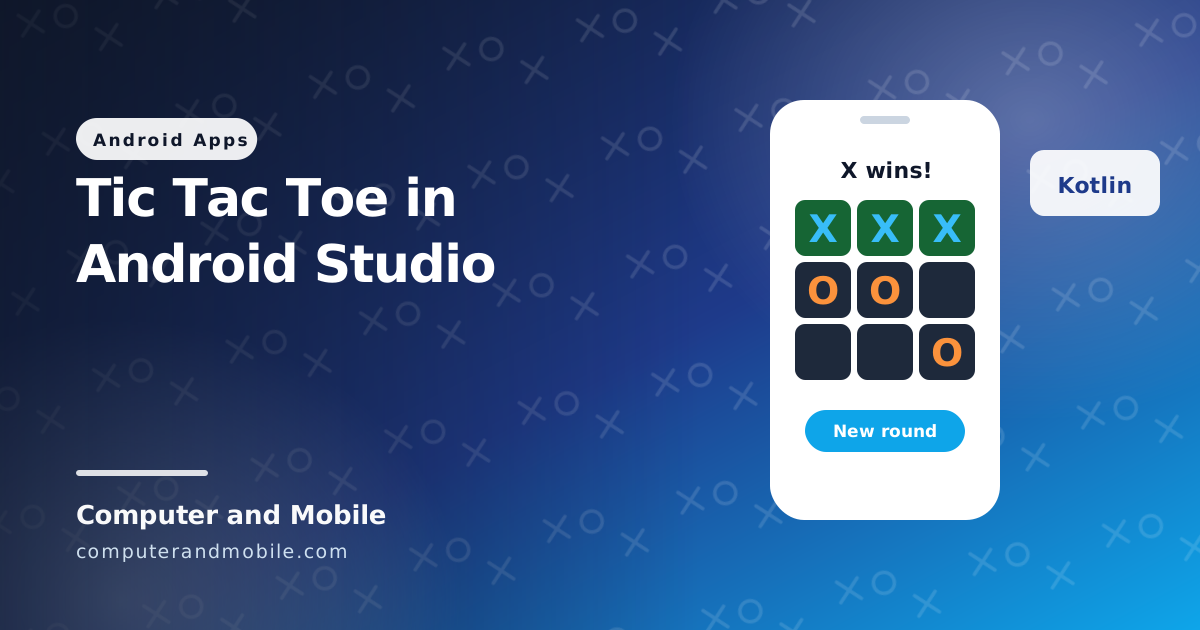
Tic Tac Toe is the classic first game to build in Android Studio: small enough to finish in an evening, but it teaches everything a real app needs: a layout, touch input, game rules, a simple AI and keeping score. This guide gives you a complete game in Kotlin, with the whole app in MainActivity: two players on one phone, or you against the phone with an AI that never loses.
The code was compiled for Android 17 (API 37), and its game logic was tested on every possible game. You will also find an HTML version, the winner check in Java, and how to build the APK.
Make the project
- In Android Studio, choose New Project, then Empty Activity. Name it
Tic Tac Toe, language Kotlin, minimum SDK 24 or newer. - Open
MainActivity.ktand replace everything except the first line (package ...) with the code below. - Press Run to play on a phone or the emulator. No permissions or extra libraries are needed.
The full Tic Tac Toe source code (Kotlin)
package com.example.tictactoe   // keep the package line Android Studio made for you

import android.graphics.Color
import android.graphics.Typeface
import android.os.Bundle
import android.os.Handler
import android.os.Looper
import android.view.Gravity
import android.widget.Button
import android.widget.GridLayout
import android.widget.LinearLayout
import android.widget.TextView
import androidx.activity.ComponentActivity
import androidx.core.view.ViewCompat
import androidx.core.view.WindowInsetsCompat

class MainActivity : ComponentActivity() {

    private val game = TicTacToe()
    private val cells = ArrayList<TextView>()
    private val handler = Handler(Looper.getMainLooper())
    private lateinit var status: TextView
    private lateinit var modeButton: Button
    private var vsPhone = true
    private var counted = false
    private var xWins = 0
    private var oWins = 0
    private var draws = 0

    override fun onCreate(savedInstanceState: Bundle?) {
        super.onCreate(savedInstanceState)
        val pad = (16 * resources.displayMetrics.density).toInt()
        val size = (resources.displayMetrics.widthPixels * 0.26).toInt()

        val root = LinearLayout(this).apply {
            orientation = LinearLayout.VERTICAL
            gravity = Gravity.CENTER
            setBackgroundColor(Color.rgb(15, 23, 42))
        }
        status = TextView(this).apply {
            textSize = 22f
            gravity = Gravity.CENTER
            setTextColor(Color.WHITE)
            setPadding(0, 0, 0, pad)
        }
        val grid = GridLayout(this).apply { rowCount = 3; columnCount = 3 }
        for (i in 0 until 9) {
            val cell = TextView(this).apply {
                textSize = 48f
                gravity = Gravity.CENTER
                typeface = Typeface.DEFAULT_BOLD
                setBackgroundColor(Color.rgb(30, 41, 59))
                setOnClickListener { play(i) }
            }
            val params = GridLayout.LayoutParams().apply {
                width = size
                height = size
                setMargins(pad / 4, pad / 4, pad / 4, pad / 4)
            }
            grid.addView(cell, params)
            cells.add(cell)
        }
        modeButton = Button(this).apply { setOnClickListener { vsPhone = !vsPhone; newRound() } }
        val again = Button(this).apply { text = "New round"; setOnClickListener { newRound() } }

        root.addView(status)
        root.addView(grid)
        root.addView(modeButton)
        root.addView(again)
        // Keep the game clear of the status bar and navigation bar (Android 15+ draws edge to edge)
        ViewCompat.setOnApplyWindowInsetsListener(root) { v, insets ->
            val bars = insets.getInsets(WindowInsetsCompat.Type.systemBars())
            v.setPadding(bars.left + pad, bars.top + pad, bars.right + pad, bars.bottom + pad)
            insets
        }
        setContentView(root)
        newRound()
    }

    private fun play(i: Int) {
        if (vsPhone && game.turn == 'O') return           // the phone is thinking
        if (!game.play(i)) return                          // square taken or round over
        show()
        if (vsPhone && game.winner == null) {
            handler.postDelayed({ game.play(game.bestMove()); show() }, 400)
        }
    }

    private fun newRound() {
        handler.removeCallbacksAndMessages(null)
        game.reset()
        counted = false
        modeButton.text = if (vsPhone) "Mode: you vs phone" else "Mode: 2 players"
        show()
    }

    private fun show() {
        val line = TicTacToe.winningLine(game.board)
        for (i in 0 until 9) {
            val mark = game.board[i]
            cells[i].text = if (mark == ' ') "" else mark.toString()
            cells[i].setTextColor(if (mark == 'X') Color.rgb(56, 189, 248) else Color.rgb(251, 146, 60))
            cells[i].setBackgroundColor(if (line != null && i in line) Color.rgb(22, 101, 52) else Color.rgb(30, 41, 59))
        }
        val w = game.winner
        if (w != null && !counted) {
            when (w) { 'X' -> xWins++; 'O' -> oWins++; else -> draws++ }
            counted = true
        }
        val result = when (w) {
            null -> "${game.turn} to play"
            'D' -> "Draw!"
            else -> "$w wins!"
        }
        status.text = "$result\nX $xWins  ·  O $oWins  ·  draws $draws"
    }

    override fun onDestroy() {
        handler.removeCallbacksAndMessages(null)
        super.onDestroy()
    }
}

// --- game logic: plain Kotlin, no Android, so it is easy to test ---
class TicTacToe {
    val board = CharArray(9) { ' ' }
    var turn = 'X'
        private set
    var winner: Char? = null          // 'X', 'O', or 'D' for a draw
        private set

    fun play(i: Int): Boolean {
        if (winner != null || i !in 0..8 || board[i] != ' ') return false
        board[i] = turn
        winner = winnerOf(board)
        turn = other(turn)
        return true
    }

    fun reset() {
        board.fill(' ')
        turn = 'X'
        winner = null
    }

    /** The best square for whoever's turn it is (minimax): the phone never loses. */
    fun bestMove(): Int {
        val me = turn
        return (0 until 9).filter { board[it] == ' ' }.maxBy { i ->
            board[i] = me
            val score = minimax(other(me), me, 1)
            board[i] = ' '
            score
        }
    }

    // Win sooner = better, lose later = less bad
    private fun minimax(player: Char, me: Char, depth: Int): Int {
        when (winnerOf(board)) {
            me -> return 10 - depth
            other(me) -> return depth - 10
            'D' -> return 0
        }
        val scores = (0 until 9).filter { board[it] == ' ' }.map { i ->
            board[i] = player
            val score = minimax(other(player), me, depth + 1)
            board[i] = ' '
            score
        }
        return if (player == me) scores.max() else scores.min()
    }

    companion object {
        private val LINES = arrayOf(
            intArrayOf(0, 1, 2), intArrayOf(3, 4, 5), intArrayOf(6, 7, 8),   // rows
            intArrayOf(0, 3, 6), intArrayOf(1, 4, 7), intArrayOf(2, 5, 8),   // columns
            intArrayOf(0, 4, 8), intArrayOf(2, 4, 6)                         // diagonals
        )

        fun other(mark: Char) = if (mark == 'X') 'O' else 'X'

        fun winningLine(b: CharArray): IntArray? =
            LINES.firstOrNull { (a, c, d) -> b[a] != ' ' && b[a] == b[c] && b[c] == b[d] }

        fun winnerOf(b: CharArray): Char? {
            winningLine(b)?.let { return b[it[0]] }
            return if (b.none { it == ' ' }) 'D' else null
        }
    }
}| Part | What it does |
|---|---|
GridLayout with 9 TextViews | The board, built in code, so there is no XML layout to keep in step |
ViewCompat.setOnApplyWindowInsetsListener | Keeps the game clear of the status and navigation bars, because apps targeting Android 15 and newer are drawn edge to edge |
TicTacToe.play() | Refuses taken squares and moves after the game is over, then checks for a winner and switches turns |
LINES and winnerOf() | The 8 ways to win (3 rows, 3 columns, 2 diagonals), and “D” for a full board with no line |
bestMove() and minimax() | The phone tries every possible rest of the game and picks the move with the best result, so it never loses |
10 - depth | Prefers winning sooner and losing later, so the phone also finishes a game when it can |
handler.postDelayed(..., 400) | A short pause before the phone moves, so it feels like it is thinking |
winningLine() | Colours the three winning squares green |
We tested the TicTacToe class on its own: the phone takes a win when it can, blocks your line when it must, and in all 569 games where a player tries every possible move, it never lost once.
Make the phone easier to beat
A perfect player is no fun for long. To let people win sometimes, replace the postDelayed line in play() with:
// In play(): let the phone make a random move 3 times out of 10, so people can win sometimes
val free = (0 until 9).filter { game.board[it] == ' ' }
val pick = if (kotlin.random.Random.nextInt(10) < 3) free.random() else game.bestMove()
handler.postDelayed({ game.play(pick); show() }, 400)
How to get the Tic Tac Toe APK (download it to your phone)
- In Android Studio choose Build, Generate App Bundles or APKs, Generate APKs.
- When it finishes, click locate: the file is
app/build/outputs/apk/debug/app-debug.apk. - Copy it to your phone and open it to install (allow installs from your file manager when asked).
For Google Play you need a signed release build and an Android App Bundle; see how to publish an app on Google Play, and note the new Android developer verification rules for apps installed outside Play.
Put it on GitHub
In Android Studio choose Git, GitHub, Share Project on GitHub, sign in, and it creates the repository and uploads the code. A finished, working game with a short README and a screenshot is a good first project to show employers or teachers.
Tic Tac Toe in HTML
The same game for the browser, in one index.html file. Save it and open it:
<!DOCTYPE html>
<html lang="en">
<head>
<meta charset="UTF-8">
<meta name="viewport" content="width=device-width, initial-scale=1">
<title>Tic Tac Toe</title>
<style>
  body { font-family: system-ui, sans-serif; text-align: center; background: #0f172a; color: #fff; }
  #board { display: grid; grid-template-columns: repeat(3, 90px); gap: 8px; justify-content: center; margin: 20px; }
  #board button { height: 90px; font-size: 48px; font-weight: 800; border: 0; border-radius: 12px; background: #1e293b; color: #38bdf8; }
  #board button.o { color: #fb923c; }
  #again { padding: 10px 20px; font: inherit; }
</style>
</head>
<body>
<h1>Tic Tac Toe</h1>
<p id="msg">X to play</p>
<div id="board"></div>
<button id="again">New round</button>
<script>
const LINES = [[0,1,2],[3,4,5],[6,7,8],[0,3,6],[1,4,7],[2,5,8],[0,4,8],[2,4,6]];
let board, turn, over;

function winner() {
  for (const [a, b, c] of LINES) if (board[a] && board[a] === board[b] && board[b] === board[c]) return board[a];
  return board.every(Boolean) ? 'draw' : null;
}

function play(i) {
  if (over || board[i]) return;
  board[i] = turn;
  const w = winner();
  over = !!w;
  turn = turn === 'X' ? 'O' : 'X';
  draw(w);
}

function draw(w) {
  const el = document.getElementById('board');
  el.innerHTML = '';
  board.forEach((mark, i) => {
    const b = document.createElement('button');
    b.textContent = mark;
    if (mark === 'O') b.className = 'o';
    b.onclick = () => play(i);
    el.appendChild(b);
  });
  document.getElementById('msg').textContent = w === 'draw' ? 'Draw!' : w ? w + ' wins!' : turn + ' to play';
}

function reset() { board = Array(9).fill(''); turn = 'X'; over = false; draw(null); }
document.getElementById('again').onclick = reset;
reset();
</script>
</body>
</html>
Tic Tac Toe in Java
The rules are the same in any language. Here is the winner check in Java, which you can drop into a Java Android project or run on its own with javac TicTacToe.java and java TicTacToe:
// TicTacToe.java: the winner check in Java (the same rules as the Kotlin game)
public class TicTacToe {
    static final int[][] LINES = {
        {0, 1, 2}, {3, 4, 5}, {6, 7, 8},   // rows
        {0, 3, 6}, {1, 4, 7}, {2, 5, 8},   // columns
        {0, 4, 8}, {2, 4, 6}               // diagonals
    };

    /** Returns 'X' or 'O' for a winner, 'D' for a draw, or ' ' while the game goes on. */
    static char winnerOf(char[] b) {
        for (int[] l : LINES) {
            if (b[l[0]] != ' ' && b[l[0]] == b[l[1]] && b[l[1]] == b[l[2]]) return b[l[0]];
        }
        for (char c : b) if (c == ' ') return ' ';
        return 'D';
    }

    public static void main(String[] args) {
        System.out.println(winnerOf("XXXOO    ".toCharArray()));   // X
        System.out.println(winnerOf("XOXXOOOXX".toCharArray()));   // D
    }
}
How to play Google's Tic Tac Toe
Search Google for tic tac toe and a playable board appears at the top of the results. You can play against Google's computer on easy, medium or impossible, or against a friend on the same screen. The “impossible” level plays perfectly, just like the minimax AI above.
More simple game projects for Android Studio
- Connect 4: the same idea on a 7 × 6 board, with gravity
- Snake: a game loop and a growing list of squares
- Memory match: flip cards and match pairs
- A tap game with a high score, as in our game app guide
From one phone to online games
Playing on one phone is the easy part. Tic Tac Toe between two people on two phones needs much more: a server that matches players, sends each move to the other phone in real time, checks that moves are legal so nobody cheats, handles a player who leaves or loses signal, and offers a rematch. Add chat and invitations, and you have a social app.
Ready-made games with source code
- Our Mini Games app source code is a game hub for Android with built-in offline games, Tic Tac Toe among them (plus Snake, Memory Match, Match-3 and more), HTML5 games loaded from your own server, scores and achievements, and a PHP admin panel.
- Our chat apps have games inside the chat, played live between two people: the live video chat app (Tic Tac Toe, Ludo, Words, Pool and Dare) and the video call chat app (Tic Tac Toe, Connect 4 and Ludo).