What Is llms.txt? What It Does, What It Doesn't, and How to Make One
llms.txt is a short Markdown map of your website for AI tools. Here is what it is, the format with an example, how it differs from robots.txt and llms-full.txt, what Google said about it in 2026, and a tested script that builds one from your sitemap.
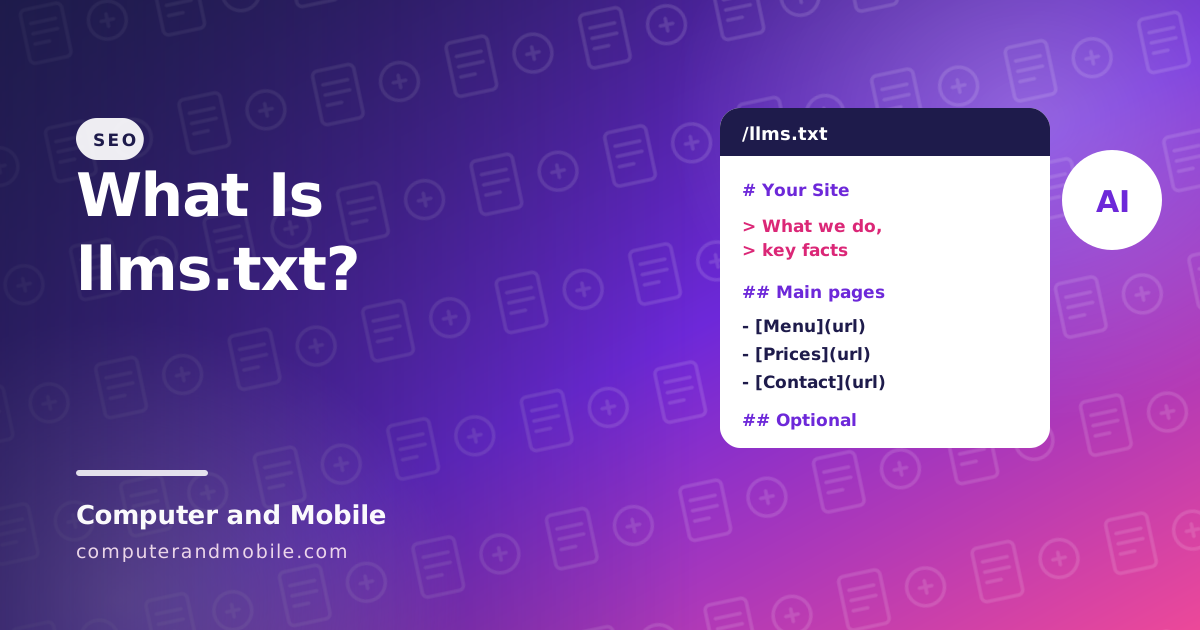
llms.txt is a short text file in Markdown, placed at yourdomain.com/llms.txt, that tells AI tools what your website is about and which pages matter most. Think of it as a menu for language models: instead of guessing from your full pages, menus and ads, an AI assistant can read one clean summary with links.
There is also a lot of hype around it. This guide explains what llms.txt is, the exact format with an example, how it differs from robots.txt and llms-full.txt, what Google said about it in 2026, and gives you a tested script that builds one from your sitemap.
What is llms.txt used for?
Large language models (LLMs) such as ChatGPT, Claude and Gemini work best with short, plain text. A normal web page is mostly navigation, scripts and layout. llms.txt gives an AI tool:
- A one-line summary of the site or project
- Key facts it should know, such as opening hours, prices or which version of a product is current
- A list of the important pages, each with a link and a short note
It is most useful for documentation and developer tools, where AI coding assistants fetch it to learn an API, and for any site that wants to hand AI agents a clean summary.
Is llms.txt a real thing?
Yes, but it is a proposal, not an official web standard. Jeremy Howard of Answer.AI published it at llmstxt.org in September 2024, and an updated version of the proposal appeared in August 2026. Thousands of sites now publish one, especially documentation sites. No standards body such as the W3C or IETF has adopted it, and no search engine is required to read it.
Does llms.txt help SEO?
Not in Google. In June 2026 Google added a note to its guidance saying an llms.txt file is not needed to appear in Google Search, and that it neither helps nor hurts rankings, because Google Search ignores it. Google's AI Overviews and AI Mode use the same search index, so the file does not change your visibility there either. Google's Gary Illyes had already said in 2025 that Google does not support it, and John Mueller compared it to the old meta keywords tag.
Other AI companies have not publicly confirmed that their answer engines use it either. So treat llms.txt as a small, free extra for AI tools and agents, not as a ranking factor. What gets you into AI answers is the same as for search: clear pages that answer questions directly, structured data, and real expertise.
Is llms.txt mandatory?
No. Nothing breaks without it, and no search engine penalises a site that does not have one. Add it if it takes you a few minutes, or if your site is documentation that developers use with AI tools.
The llms.txt format, with an example
The proposal asks for Markdown in this order:
- An H1 with the name of the site or project (the only required part)
- A blockquote (
>) with a short summary and key facts - Optional paragraphs or lists with more details
- H2 sections with lists of links:
- [Page name](url): note - An optional section called Optional, for pages an AI tool can skip when it is short of space
Here is an example for a small business:
# Sunrise Bakery

> Family bakery in Leeds, UK, baking sourdough, cakes and pastries since 2009.
> Open Tuesday to Sunday, 7 am to 5 pm. Orders for cakes need 3 days' notice.

Prices include VAT. We deliver within 10 miles of the shop.

## Main pages

- [Menu and prices](https://www.example.com/menu/): every bread, cake and pastry with its price
- [Custom cakes](https://www.example.com/cakes/): how to order a birthday or wedding cake
- [Opening hours and address](https://www.example.com/contact/): map, phone and parking

## Guides

- [How to store sourdough](https://www.example.com/blog/store-sourdough/): keep bread fresh for 5 days

## Optional

- [Our story](https://www.example.com/about/): the family and the shop
llms.txt vs robots.txt, llms-full.txt and AGENTS.md
| File | What it is for | Who reads it |
|---|---|---|
robots.txt | Rules: which crawlers may visit which pages | Search engines and well-behaved AI crawlers obey it |
llms.txt | A summary and a map of key pages; it sets no rules | AI tools and agents that choose to fetch it |
llms-full.txt | The full text of all key pages in one file, often for documentation | AI tools that want everything in one request |
Page .md versions | The proposal also suggests a plain Markdown copy of each page at the same address plus .md | AI tools reading single pages |
AGENTS.md | Instructions for AI coding agents, inside a code repository, not a website | Coding assistants working on that code |
| Schema (JSON-LD) | Structured facts inside each page: article, product, FAQ | Google and other search engines use it |
If you want AI crawlers to stay away from your site, that is a job for robots.txt, not llms.txt.
Try it: generate llms.txt from your sitemap
Writing the file by hand is fine for a small site. For a bigger one, this PHP script reads your sitemap.xml, opens each page, takes its title and meta description, groups the pages, and writes the file in the format above. Run it on your computer (with PHP installed) or on a server:
<?php
// make-llms.php: builds an llms.txt from your sitemap.
// Run:  php make-llms.php https://yourdomain.com/sitemap.xml "Your Site Name" > llms.txt
// Then upload llms.txt to the root of your website.

$sitemap = $argv[1] ?? '';
$name    = $argv[2] ?? 'My Website';
$limit   = 200;    // big sitemaps: keep the most useful pages, not thousands

if (!preg_match('#^https?://#', $sitemap)) {
    fwrite(STDERR, "Usage: php make-llms.php https://yourdomain.com/sitemap.xml \"Site Name\"\n");
    exit(1);
}

function fetch($url) {
    $context = stream_context_create(['http' => ['timeout' => 10, 'user_agent' => 'make-llms/1.0']]);
    return @file_get_contents($url, false, $context);
}

function one_line($text) {
    return trim(preg_replace('/\s+/', ' ', html_entity_decode(strip_tags((string)$text), ENT_QUOTES, 'UTF-8')));
}

$xml = @simplexml_load_string((string)fetch($sitemap));
if (!$xml) {
    fwrite(STDERR, "Could not read the sitemap.\n");
    exit(1);
}

$sections = [];
$summary  = '';
foreach ($xml->url as $entry) {
    if ($limit-- <= 0) { break; }
    $url  = (string)$entry->loc;
    $html = (string)fetch($url);
    if ($html === '' || preg_match('/<meta[^>]+name=["\']robots["\'][^>]+noindex/i', $html)) { continue; }

    preg_match('#<title[^>]*>(.*?)</title>#is', $html, $t);
    preg_match('#<meta[^>]+name=["\']description["\'][^>]+content=["\']([^"\']*)#i', $html, $d);
    $title = one_line($t[1] ?? $url);
    $title = preg_replace('/\s+[|·–-]\s+' . preg_quote($name, '/') . '$/u', '', $title);   // drop " | Site Name"
    $desc  = one_line($d[1] ?? '');

    $path = trim((string)parse_url($url, PHP_URL_PATH), '/');
    if ($path === '') {                       // the home page gives the summary
        $summary = $desc;
        continue;
    }
    $group = ucwords(str_replace('-', ' ', explode('/', $path)[0]));
    $group = substr_count($path, '/') === 0 ? 'Pages' : $group;
    $sections[$group][] = "- [$title]($url)" . ($desc !== '' ? ": $desc" : '');
}

echo "# $name\n\n";
if ($summary !== '') { echo "> $summary\n\n"; }
foreach ($sections as $group => $items) {
    echo "## $group\n\n" . implode("\n", $items) . "\n\n";
}| Part | What it does |
|---|---|
simplexml_load_string | Reads the list of page addresses from your sitemap |
The noindex check | Leaves out pages you have hidden from search |
<title> and meta description | Become the link text and the note after it; the site name is taken off the end of each title |
| The home page | Its description becomes the summary blockquote |
| The groups | Pages at the top level go under “Pages”; pages in folders such as /shop/ get their own section |
$limit | Stops after 200 pages: an llms.txt should list your best pages, not all of them |
Read the result before you upload it: shorten long notes, remove pages that do not help, and add one or two key facts to the summary. Then upload llms.txt to your site's root folder and open https://yourdomain.com/llms.txt to check that it shows as plain text.
llms.txt best practices
- Lead with facts: what you are, where, prices, versions, opening hours
- List your best pages, each with one clear sentence
- Keep it up to date when prices, versions or pages change; an old llms.txt is worse than none
- Use plain Markdown: no HTML, no keyword lists
- Check it like a validator would: the first line starts with
#, every list item has a working[name](url)link, and the file opens without a login
llms.txt on WordPress and other platforms
Several SEO plugins for WordPress can now create llms.txt for you, and Shopify and other platforms have apps that do the same. Check what the plugin puts in it: an automatic list of every post is less useful than a short, hand-checked one.
What does “LLM text” mean?
LLM stands for large language model, the kind of AI behind ChatGPT, Claude and Gemini. “LLM text” usually means either text written by such a model, or text prepared for one to read. The name llms.txt means the second: a text file written for LLMs.
Getting into AI answers for real
Because the big AI search products work from search indexes, the work that gets you cited is classic, careful SEO:
- Answer questions directly near the top of each page, in plain sentences
- FAQ sections with real questions people ask, and FAQ structured data
- Structured data for articles, products and your business
- Original facts: prices, tests, your own numbers, which AI tools can quote
- Fast pages that work without scripts, so every crawler sees the full text
Scripts that do this for you
Our online web tools website includes an llms.txt generator among its 61 tools, together with a meta tag generator, robots.txt generator and checker, an Open Graph checker and an SEO analyzer, so your visitors can make these files on your site. Our blog CMS and game portal build their own llms.txt, sitemap and structured data automatically from the database, so a new post or game appears in all of them at once.